Tech Desk
  Feb 06, 2026
Spotify on Friday launched a new feature, named 'Page Match', which allows users to sync their progress across audiobooks, e-books, and physical books.
The music streaming platform said that instead of guessing where you left off, you can scan a page and continue instantly in another format. If any Spotify user is reading a physical book or an e-book and want to move to the audiobook, then:
- Open the title in Spotify
- Tap the 'Page Match' button and select 'Scan' to listen.
- After allowing camera access, take a photo of the page you are currently on.
- Spotify will match that page to the exact moment in the audiobook.
- Then you will see two options: Play from here or save for later.
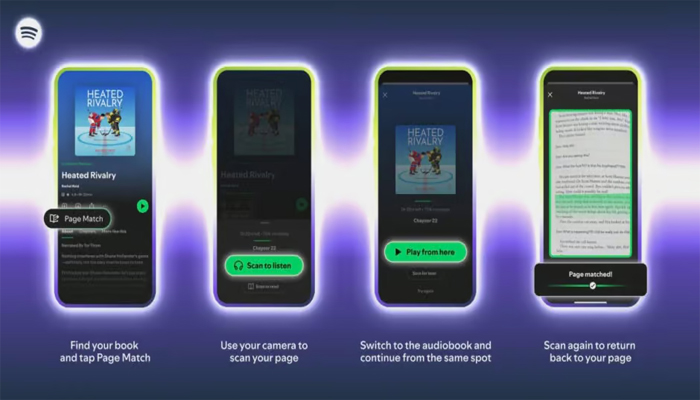
The 'Page Match' feature also works the other way, if you're listening and want to switch back to reading, then:
- Open the audiobook and tap the Page Match button.
- Tap 'Scan' to read and scan any page in your book or e-book.
- Spotify will detect where you stopped listening.
- It will then guide you by telling you to flip forward or backward until you reach the correct passage.
Spotify's 'Page Match' availability
Spotify stated that 'Page Match' will roll out to audiobook listeners on iOS and Android by the end of February. Initially, it will support most English-language titles, with the plans of expansion in the future.
The company announced a collaboration with Bookshop.org. Through this deal, users in the United States (US) and United Kingdom (UK) will be able to purchase physical books directly inside the Spotify app.